AI for Kids・Askie
- 4.3
- Rating
- 10.00K
- Installs
- Free
- Price
 Analysis by App-foxy
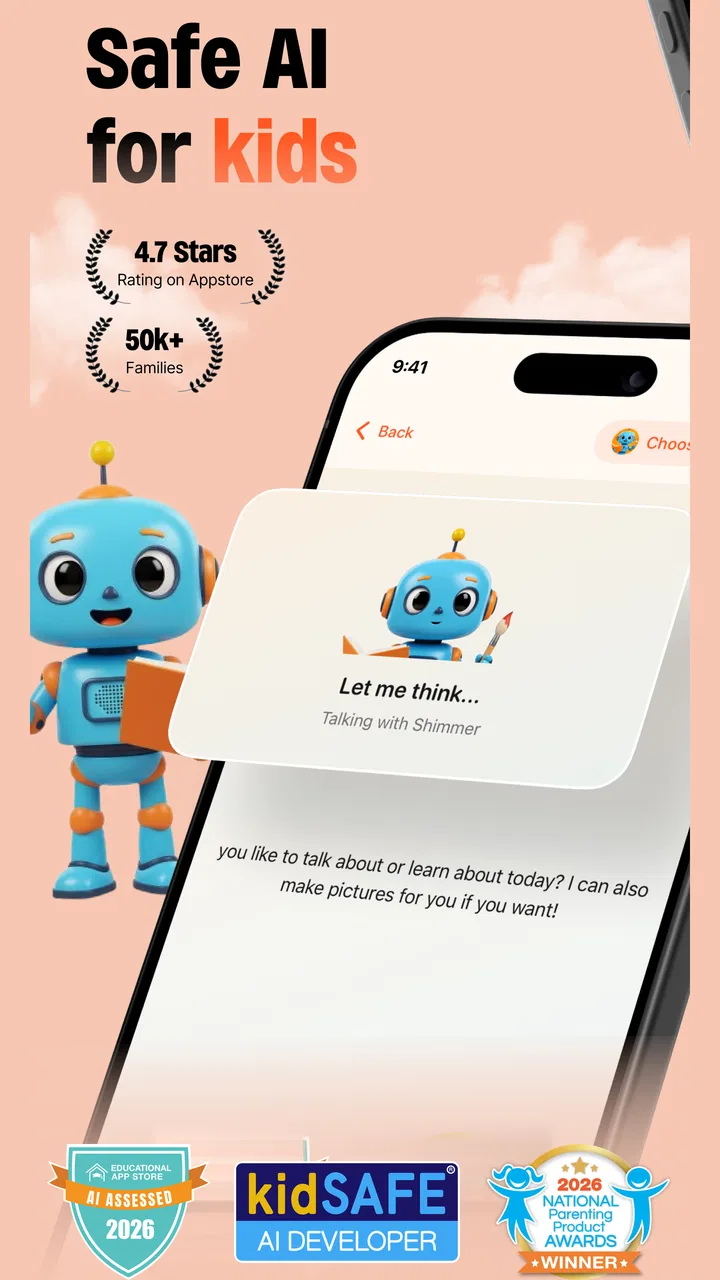
When I look at AI for Kids・Askie, I see a parenting app trying to solve a very modern problem: how to let children explore artificial intelligence without handing them an unrestricted general-purpose chatbot. Its focus is narrower and more practical than a typical adult AI assistant, combining voice conversation, art creation, and learning in one child-oriented experience. My overall view is positive but careful: it can be a useful supervised activity, yet I would not treat it as a replacement for a parent, teacher, library, or carefully chosen educational app.
The app is free to download, which makes it easy to test before deciding whether it belongs in your family’s routine. It is developed by Sbeno and sits in the parenting category rather than presenting itself as a conventional school tool. That distinction matters. I found its value strongest when an adult stays nearby, helps a child phrase questions, and turns the answers into a conversation instead of leaving the child alone with the screen.
Its store positioning emphasizes safe AI for children, voice chat, artwork, and learning. Those elements give the app a clear identity, but they also create a responsibility for parents: an AI response can sound confident even when it needs checking. Askie works best as a guided curiosity tool, not as an authority.
You May Also Like

 Pandora - Music & Podcasts
Pandora’s Music Is Easy to Start, but Harder to Recover
Pandora’s strength is its low-effort path from a seed to a station. Its weak spot is how much confidence it asks you to place in connection, setup, and quiet recovery.

 8 Ball Pool
 Is Built on Rivalries, Rematches, and Routine
A close look at the rivalries, rematches, shared routines, and unanswered safety questions that turn a quick pool match into a persistent mobile community.

 Samsung Music
’s Quiet Strength Is Playing What You Already Own
Its reach comes less from spectacle than from dependable access to a personal library. That simplicity is both the app’s strongest retention engine and its ceiling.

 AccuWeather: Weather Radar
AccuWeather Review: A Quick, Clear Forecast for Everyday Decisions
For everyday plans, the best forecast is the one you can understand quickly. AccuWeather makes rain timing, radar, and local conditions easy to act on, with a few trade-offs.

 Hill Climb Racing
Why Hill Climb Racing Still Turns Crashes Into One More Run
A tiny car, a bumpy hill and one more upgrade: Hill Climb Racing keeps resurfacing because its simple chaos makes every near-miss feel personal.

 AliExpress - Shopping App
AliExpress Makes Global Shopping Feel Personal, but Shoppers Bear the Risk
AliExpress turns a global marketplace into a pocket-sized discovery engine. Its reach is useful, its shopping loop compelling, and its trade-offs easy to miss.
More From Our News Desk
View All News


How the experience comes together
I find the most useful way to judge this kind of tool is to decide what you want a child to do after the conversation, not just whether the AI gives an engaging answer. A question that leads to a drawing, a discussion, or a check in a trusted book gives the session a purpose and makes it easier to supervise. With that practical lens in place, it becomes clearer where this experience fits among other ways children learn and create.
A child-friendly way to begin with AI
The most approachable part of the concept is the ability to communicate by voice. Younger children may find speaking more natural than typing, especially when spelling is still developing or when they want to ask a long, imaginative question. A child can move from “Why do stars shine?” to a follow-up question without needing to formulate everything like a search query.
That conversational style can make learning feel less like completing a worksheet. In my view, it is particularly suitable for short bursts: a question after a book, a discussion during a quiet afternoon, or a quick exploration while a parent is cooking nearby. The child gets an immediate response, while the adult can encourage better questions rather than simply supplying answers.
Voice interaction also changes the supervision requirement. A parent may notice what a child is asking when the exchange is spoken aloud, but spoken answers can move quickly and may be harder to review later than written ones. I would therefore use it in a shared room for younger children, especially at the beginning. The purpose is not to create another private channel between a child and a machine; it is to make a child’s curiosity easier to support.
Art creation adds a useful second mode
The art side gives the app a different rhythm from ordinary question-and-answer tools. Instead of stopping when the child receives an explanation, the conversation can lead to a creative result. A discussion about underwater animals might become a prompt for an illustration; a story idea might become a visual starting point. That connection between asking, imagining, and making is one of the more convincing reasons to try this particular app.
I would encourage children to describe what they want in stages rather than asking for a perfect image immediately. First, they can choose the subject. Then they can add the setting, mood, colors, or unusual details. This turns image creation into a language exercise and helps children understand that better instructions usually produce more useful results. It also gives parents an easy way to discuss how AI follows prompts rather than reading a child’s mind.
There is a trade-off here. A generated picture can be exciting, but it can also make the creative process feel finished too soon. I would ask the child to draw something by hand after using the app, compare the two results, or explain which details they would change. That simple follow-up keeps the activity from becoming passive consumption and makes the art feature more educational.
Learning value depends on the adult’s follow-through
The learning promise is broad rather than tied to one school subject. That can be an advantage for families who want a flexible tool for questions, stories, explanations, and creative projects. It can also be a weakness for someone expecting a structured curriculum with lessons, progress tracking, or a clear sequence of skills. I would not choose it as the main study system for a child who needs systematic practice in mathematics, reading, spelling, or exam preparation.
Instead, I see it as a companion for open-ended learning. A child can ask for a simpler explanation, request an example, or use a creative prompt to make an unfamiliar topic less intimidating. The parent’s role is important because the first answer should often be the beginning of the activity, not the end. Asking “How could we check that?” or “Can you explain it in your own words?” turns a quick AI response into a more meaningful learning moment.
One practical workflow is to set a small challenge before opening the app. For example, ask the child to find out three things about an animal, then create a picture that includes those details. Afterward, review the result together and identify which parts came from the conversation and which parts were the child’s own imagination. This gives the app a clear purpose and prevents aimless screen time.
What the numbers suggest about maturity
AI for Kids・Askie has an average rating of 3.5 from 84 ratings, with 9 written reviews, and it has passed 10K+ installs. I read that as a sign of a small, still-developing product rather than a deeply established family standard. The rating is neither a reason to reject it nor a reason to install without thinking; it suggests that expectations and individual experiences may vary.
The app was released on October 25, 2025, and its current version is 1.0.122. Those details place it in an early stage of its public life. I would keep expectations realistic about polish and consistency, and I would pay attention to how my child responds over several sessions rather than deciding from one impressive conversation or one frustrating moment.
Everyday use: a realistic family scenario
Imagine a child returning home with a question about why some animals are active at night. During a short supervised session, the child asks the question by voice, follows up about eyesight and hearing, and then asks for an imaginative nighttime forest picture. A parent can pause after each answer, correct an oversimplification, and invite the child to add a fact to the visual prompt.
That scenario shows where the app could earn a place in a household. It is not doing one job only: it supports conversation, a small research moment, and a creative response. The parent does not need to prepare a lesson, but still has several opportunities to guide the child. If the child later explains the topic to a sibling or writes a few sentences about it, the value extends beyond the app session.
I would avoid using the same activity when the child is tired, upset, or looking for a quick answer to homework. In those situations, the voice feature may encourage rapid questioning without reflection, while a generated image may distract from the original task. The best sessions have a beginning, a question worth exploring, and a clear offline follow-up.
Where it is stronger than familiar alternatives
Compared with a standard search engine, the app feels more accessible for a child who struggles with typing or does not know how to turn curiosity into effective search terms. The conversational approach can also make follow-up questions feel natural. Compared with a drawing app, it offers a way to move from spoken ideas to a visual result. Compared with a fixed educational app, it is more open-ended and better suited to unexpected interests.
Those advantages come with corresponding limitations. Search engines provide access to multiple sources, while a child-focused AI response may offer one smooth explanation that still needs checking. A traditional art app gives the child direct control over every mark, while AI-assisted creation can reduce hands-on practice. A structured learning app usually offers clearer progression, whereas Askie’s flexibility may feel unfocused for families seeking measurable academic improvement.
For that reason, I would not ask which type of app is universally best. I would ask what the child needs at that moment. Choose Askie for guided conversation and imaginative exploration. Choose a conventional drawing tool when the goal is fine-motor practice and personal technique. Choose a structured educational product when the goal is repeated skill-building with a defined path. The three options serve different purposes.
The main weakness: safety is a process, not just a label
The app is marked Everyone, and its central idea is child-oriented AI, but an age label should not be confused with complete supervision. AI systems can misunderstand a question, give an incomplete explanation, or respond in a tone that does not fit a particular child. Even a well-intentioned answer may need context that the app cannot know, such as a child’s learning level, family values, or emotional situation.
This is the most meaningful limitation for me. Parents should establish simple rules before use: do not share private information, do not treat the response as medical or emergency advice, and ask an adult when a topic feels worrying or confusing. I would also make it clear that the child can stop the conversation at any time and bring the question to a trusted person instead.
Voice interaction deserves extra attention because children may speak more freely than they type. I would avoid sessions involving personal names, school details, home locations, passwords, family conflicts, or anything that identifies another child. This is not a criticism unique to Askie; it is a sensible boundary for any child-facing conversational technology. The app becomes easier to manage when the family treats it as a shared creative tool rather than a confidential companion.
Costs and the practical decision to try it
The download is free, but in-app purchases range from $3.99 to $179.99 per item. That is a wide spread, so I would check every purchase screen carefully and set expectations with the child before exploring the creative or conversational tools. A free entry point is useful, but it does not automatically mean that every part of the experience will remain free during regular use.
My advice is to begin with a defined trial routine rather than allowing unrestricted experimentation. Decide how often the child will use it, what kind of activity you want to test, and who will handle any purchase decision. If the app becomes part of family life, review whether it is genuinely adding something that your existing books, drawing supplies, and educational tools do not already provide.
The minimum operating system is Android 8.0, which makes the technical entry requirement relatively approachable for compatible devices. Still, the more important question is not simply whether it installs. It is whether the device has a comfortable microphone, whether the child can use voice interaction clearly, and whether the family can supervise without turning the activity into a constant argument about screen time.
Who should use it, and who should skip it
I think the best audience is families with curious children who enjoy asking “why” questions, inventing stories, or turning ideas into pictures. It may suit a parent who wants a low-preparation activity for weekends, travel, or quiet after-school exploration. It can also help a child who has interesting ideas but finds typing frustrating, provided an adult is available to guide the conversation.
It is less suitable for parents looking for a fully independent digital babysitter. The child-friendly framing does not remove the need for boundaries, checking, and discussion. I would also hesitate to make it the first choice for a child who becomes easily absorbed in screens, needs a tightly structured routine, or is likely to interpret every fluent answer as unquestionably true.
Children who mainly want to practice drawing may get more from a hands-on art app. Children preparing for a specific academic target may benefit more from a curriculum-based tool. Families that prefer learning from books and verified reference sources may find the open-ended AI format less comfortable. In each case, skipping Askie is not a failure; it simply means the app’s flexible strengths do not match the household’s immediate goal.
Small habits that improve the experience
I found that the quality of the session depends heavily on the prompt. Encourage the child to include an age-appropriate goal, a subject, and a preferred style or format. “Tell me about volcanoes” is a starting point, while “Explain volcanoes in simple language, give me one safe example, and ask me a question afterward” creates a more useful learning exchange.
Another helpful habit is to separate imagination from fact. Before creating art, ask the child which parts should be realistic and which parts can be magical. Afterward, discuss the difference. This is a small but valuable way to teach media awareness: an attractive image is not automatically a factual image, and a confident explanation is not automatically a complete one.
Finally, end each session with an offline action. The child might sketch a variation, tell the story aloud, look up a topic in a trusted book, or explain one new idea to a parent. That final step is what keeps the app from becoming a sequence of fleeting answers. It also gives the adult a better sense of whether the child understood the material or merely enjoyed the interaction.
My final recommendation
AI for Kids・Askie is an appealing experiment in supervised, child-oriented AI. Its combination of voice chat, learning conversations, and art creation gives it more personality than a basic reference app, and the free starting point makes a cautious trial reasonable. I especially like it for short, shared activities where a child’s question becomes a discussion and then a creative project.
My recommendation is therefore conditional but clear: try it if you want a flexible curiosity companion and are willing to stay involved. Keep personal information out of the conversation, check important answers, watch purchase prompts, and give every session an offline purpose. If you need a structured curriculum, a purely hands-on drawing experience, or completely independent screen time, another kind of app will serve you better.
For families that understand those boundaries, the strongest reason to choose AI for Kids・Askie is not that it answers children’s questions automatically, but that it can help adults turn those questions into shared learning and creativity. That is a worthwhile role, as long as the human guidance remains at the center.
FAQs for AI for Kids・Askie
01What is AI for Kids・Askie and how does it work?
AI for Kids・Askie is an educational app designed to introduce children to the basics of artificial intelligence through interactive and engaging activities. The app uses kid-friendly language and colorful graphics to explain complex AI concepts in a simple manner. It includes quizzes and games that help reinforce learning and keep children entertained.
02Is AI for Kids・Askie suitable for all age groups?
AI for Kids・Askie is primarily designed for children aged 6 to 12 years. The content is tailored to be age-appropriate and easy to understand, with activities that challenge their understanding without overwhelming them. Parents can also participate to guide younger kids through the lessons and discussions.
03Does AI for Kids・Askie require a subscription or in-app purchases?
AI for Kids・Askie offers a free version with limited features to give users a taste of the app. For full access to all content and features, a subscription is available. The app may also offer optional in-app purchases for additional content such as new games or educational packs.
04How safe is AI for Kids・Askie for my child to use?
AI for Kids・Askie is designed with child safety in mind. It does not collect any personal data from users, ensuring privacy. Additionally, the app is free from advertisements, preventing unwanted content from being shown to children. Parental controls are available to monitor and manage app usage.
05What devices are compatible with AI for Kids・Askie?
AI for Kids・Askie is available on both Android and iOS platforms. It is compatible with most smartphones and tablets running the latest operating systems. For optimal performance, ensure your device meets the app's minimum system requirements, which are detailed on the download page.
Pros
- Engaging AI-powered learning experience.
- User-friendly interface for kids.
- Wide range of educational topics.
- Interactive and fun activities.
- Parental control features included.
Cons
- Limited offline content availability.
- Requires in-app purchases for full access.
- Some activities may be too advanced.
- Occasional app performance issues.
- Subscription model might be costly.

AI for Kids・Askie
Gallery